Unbreakable Internet for Everyone?

The credit for this blog post goes to a friend of mine. In the middle of an access-management hardening exercise, he sent me into a state of pure networking euphoria with an inspiring LinkedIn chat.

Niklas brought up an old LinkedIn post of mine in which I commented about the internet connectivity setup at my remote office. You see, I spend my days in a sparsely populated area, and the internet is not only the most essential enabler of my work but also a vital connection to the outside world for many of my hobbies and interests. Consequently, I am not easily satisfied with the network capacity available to me.

Especially since you cannot get a proper connection out here in the back of beyond, no matter how much you are willing to pay.

First and foremost, I want to highlight the Swiss Army knife of connectivity in remote locations: Starlink. It is an absolutely killer solution for challenging connectivity conditions.

Starlink only requires a sufficiently unobstructed view of the sky—a factory’s flat roof is an excellent location. Finding a suitable installation site in a city may be more difficult unless you happen to live on the top floor of an apartment building. On an island, at the bottom of a remote peninsula or in the backwoods of Lohja, however, Starlink is practically guaranteed to provide decent bandwidth. RAN connections (Radio Access Networks, better known to us as 4G and 5G) can suffer from extremely poor coverage in places like these.

You may need to clear away a few obstructing trees or mount the dish on top of a proper pole, but download speeds of around 300 Mbps are achievable anywhere in Finland. The only significant drawback is the relatively high latency.

For ordinary use, like web browsing, Teams meetings, streaming and email, it is hardly noticeable. Latency is poison for gaming, however, and it may also become irritating when working through RDP or SSH if the destination is far enough away—for example, on another continent.

My own problem is one annoyingly dynamic pine tree. It has grown enough (over 1 m!) since the installation that my connection now experiences a three-to-six-second packet loss time roughly once every five minutes. Looks like I need to raise the Starlink pole on the roof by another metre. Apparently, getting rid of the tree is not an option, as the “the headmaster” has threatened to make me sleep in the garage.

But What About Reliability?

When there is no perfect option, you have to make do with the least imperfect solutions available. The problems usually come from two directions.

First, the performance of the available connections does not meet demanding requirements, so you have to settle for whatever is available. That said, Starlink provides a level of connectivity that is perfectly sufficient for professional use, even deep in the countryside.

The second problem is trickier: connection stability does not match that of high-quality fibre. On the other hand, for someone working entirely remotely, I do not believe even a consumer fibre connection provides sufficient resilience on its own. Consumer connections are certainly not guaranteed to work continuously, and their SLAs are what they are. I have witnessed routing outages lasting more than 24 hours with several different operators.

Redundancy is relatively easy to arrange, however: use connections from multiple operators. Alongside a fibre connection, you could add even a moderately performing 4G or 5G connection. The more operators you use, the less likely it becomes that all their networks will fail simultaneously.

Finland has three nationwide mobile network operators: Telia, Elisa and DNA. In rural areas, it is extremely rare for several operators to provide sufficiently strong coverage at the same location. A prepaid 5G subscription is a good and inexpensive way to test an operator’s actual performance in your area.

My own solution is to use connections from all three mobile network operators with Starlink’s cheapest plan providing additional redundancy.

One of the mobile connections can theoretically provide excellent bandwidth. Its maximum speed has exceeded 500 Mbps in the early hours of a public-holiday morning. Unfortunately, the capacity of that mobile broadband has been heavily oversold, so during the day the available bandwidth fluctuates almost unbelievably.

The base station is also so far away that I had to use a highly directional, high-gain antenna. The other two operators provide considerably less bandwidth but also much less variation in speed. Their base stations are also close enough that an outdoor modem and careful alignment were sufficient.

This naturally costs money, but for a system that is critical to my business, the overall solution is relatively inexpensive. Starlink costs €35 per month, while the primary mobile connection costs €26.95 per month. I picked up the two backup connections through special offers. In an area with poor radio coverage there is little point paying for anything faster than 100 Mbps—because even that speed will rarely materialise.

In total, my connections cost less than €65 per month, excluding VAT. This setup has now delivered more than nine months of completely uninterrupted data connectivity. Very few enterprise-grade connections can match that.

My thinking has changed: I no longer consider a connection that relies on a single operator to be genuinely uninterrupted or resilient. It makes no difference whether you have fibre delivered through two physically separate routes, supplemented by a separate mobile backup connection. The operator still has to perform maintenance or may simply botch its routing.

The only way to achieve genuinely reliable connectivity is to distribute it across the networks of multiple operators. Modern SD-WAN technologies have made this ridiculously easy.

So, What About Bandwidth?

When several connections are used in parallel, the practical options are connection bonding and load balancing. These are two completely different ways of utilising multiple connections.

When I moved out here to the back of beyond, I initially had to bond several connections because none of the mobile operators could provide even respectable speeds with equipment installed indoors—and Starlink was not yet available. Maximum speeds were around 70 Mbps.

Bonding is often referred to as bandwidth aggregation. In plain language, this means combining the capacity of several separate connections into one larger connection. In the best-case scenario, the bandwidth available between locations X and Y will be roughly equal to the combined capacity of the individual connections.

For example, if you have connections providing 100 Mbps, 50 Mbps and 40 Mbps, you can combine them and potentially achieve close to 190 Mbps of bandwidth for a single data transfer.

Technically, the mechanism works by establishing a connection from the source to the destination through each available path. At the destination, there is a physical or virtual endpoint behind a fast internet connection. The VPN tunnels established between these points are combined (“bonded”) into a single logical connection.

For migrations and the replication of large volumes of data, this may be the only workable option if the capacity of each individual connection is too limited.

The challenge with combining tunnels is the additional latency it introduces. My aggregation point was initially hosted in Azure. We MCT’s (Microsoft Certified Trainers) receive complimentary Azure credits. However, I found myself in a situation where even a direct Starlink connection provided lower latency. Moving the aggregation point to a Finnish data centre improved the result.

In practice, bandwidth aggregation (aka bonding) is not the best solution for ordinary remote-office use. It is useful for operations that require substantial bandwidth, such as cloud migrations. Unfortunately, you have to decide at the application level which traffic should be routed through the bonded group of VPN tunnels. Teams traffic and ordinary web browsing, for example, are usually better routed elsewhere because sending them through the bonded connection may degrade the user experience. Eventually, the firewall’s routing rules become quite complicated.

Bandwidth bonding is also problematic when the underlying connections experience brief “blips.” It generally takes several seconds for the tunnels and routing to recover from an interruption. With poor-quality connections—the eternal curse of living in the woods—this can cause significant challenges.

If you nevertheless want to combine connections and achieve top-tier download speeds through aggregated bandwidth, consider a purpose-built commercial solution. Mushroom Networks and Peplink, for example, offer extremely easy-to-deploy mobile connection bonding solutions. Having tested both, I can recommend them. You really cannot go wrong. Naturally, a high-quality firewall such as a FortiGate or Palo Alto can also bond multiple WAN connections.

I have personally moved to load balancing. My firewall distributes traffic across four connections according to the following rules:

  1. Traffic from Teams and RDP sessions used by my wife and me—as we both work from here in the countryside—is always routed through the SD-WAN link with the lowest latency to the Teams service. PROVIDED that the link has no packet loss whatsoever and offers more than 70 Mbps of available download capacity and more than 20 Mbps of upload capacity. If those conditions are not met, the traffic is moved to the connection with the second-lowest latency.
  2. Web-browsing traffic is routed through the other SD-WAN members. This leaves the optimal amount of capacity on the lowest-latency connection for Teams and RDP traffic.
  3. Secondary traffic—we have more than 40 IoT devices, eight continuously reporting surveillance cameras, backup traffic and all sorts of other miscellaneous junk—is always routed through the weakest connection.
  4. After 5 p.m., gaming traffic is routed through the connection with the lowest latency.

In principle, the difference between bonding and load balancing is relatively insignificant in a multi-user environment. If you have two connections, each providing approximately 100 Mbps, shared by ten employees, it generally makes little difference to the users whether the router or firewall distributes their traffic between the two connections through load balancing or combines the connections into a single logical pipe.

Bonding becomes advantageous when an individual user or data transfer requires more capacity than a single connection can provide but is prepared to compromise on latency and resilience in return.
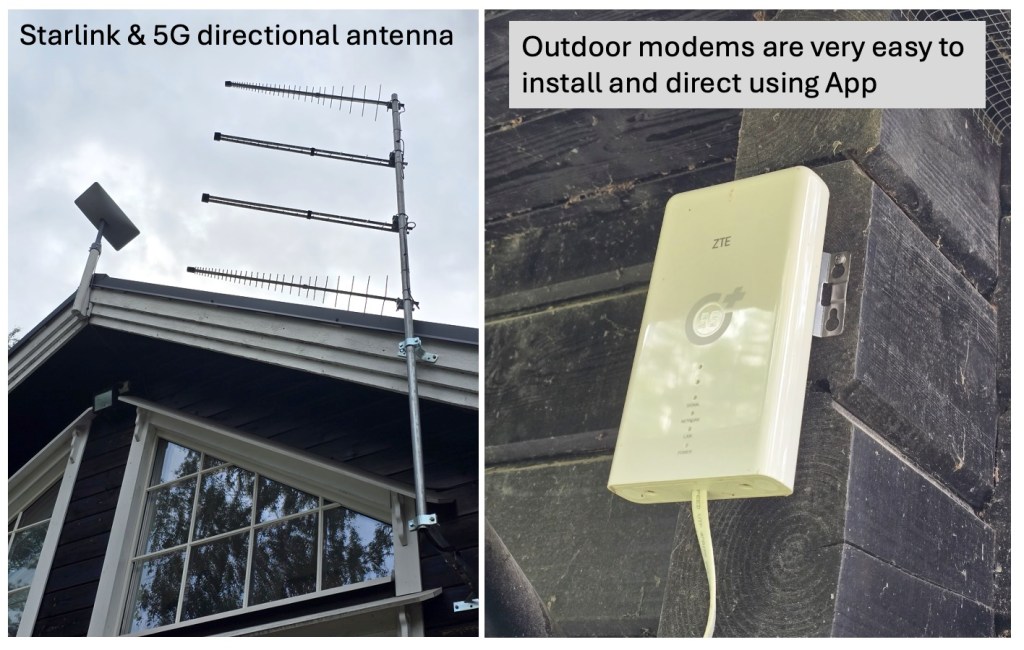
Two pictures from my setup. The first one contains Starlink antenna and then directional, high-gain 5G antenna. Next one is outdoor 5G modem – very easy to install and orient to right direction (easy App, takes just few minutes).

MCRA finally updated!

Yay! It finally happened! On April 24th, 2025, to be exact.

Microsoft’s cybersecurity reference architecture has now been updated. The previous version (v3) was released back in December 2023 — so it’s been well over a year (and nearly a half) since the last update.

This update is especially timely, considering how Microsoft has been rolling out new security tools, recommendations, and features at a dizzying pace lately.

So, what’s changed?

  • The “Core Capabilities” diagram has been revamped. It now includes things like Microsoft Security Exposure Management, Windows LAPS (for managing local admin passwords), passkeys, and Microsoft Entra Verified ID (less common in Finland). And of course, Microsoft Security Copilot has been added (fantastic, but brutally expensive).
  • Entra Permission Management has been removed (EoL – thanks to Entra’s new packaging approach).
  • Microsoft Entra ID Governance Adaptive Access has been added.
  • There’s a strong emphasis that security must be embedded everywhere. This is highlighted in the slide titled “Security must be integrated everywhere.”
  • The AI section has been updated (I’ll write a separate blog post about that soon — it’s a juicy topic).
  • A brand new “Standards Mapping” section is included. It focuses on Zero Trust reference architecture from The Open Group and maps Microsoft’s products to it. It now also includes role listings for human identities (as defined by The Open Group).
  • There’s a lot of content from The Open Group’s upcoming Security Matrix, especially around threat prioritization.
  • Secure Score seems to be trending down, while Exposure Management is on the rise.
  • The threat intelligence facts have been updated, and Microsoft’s security investments are highlighted — with some quite impressive numbers.
  • The security modernization journey is presented in an engaging and clear (sometimes even entertaining) way, along with the operating models Microsoft recommends.

It’s light to digest, with slick visuals — just a casual 115 slides in the standard deck.

If you haven’t yet downloaded the slides, do it now by – just click HERE.

Who would win? Human or AI?

Alright, I admit it. My title was peak clickbait journalism. I’m not planning to write a sci-fi epic about the battle between flesh and metal to the bitter end.

My goal is to examine the capabilities of artificial intelligence and computer-based intelligence in the field of cybersecurity and compare them to human-led security measures in similar use cases. More specifically, I will focus on Microsoft’s security stack, meaning the suite of security technologies offered by Microsoft.

What does matter? What Should Be Protected and Monitored?

In a large IT environment, there are hundreds of moving parts. There’s plenty to secure. Just vulnerability management alone can involve at least a three-digit number of operational targets. And what about cybersecurity’s classic weakest link? No, I’m not talking about Active Directory, though as a standalone technological component, it could very well fit the description. I’m referring to people—users. Those mobile, busy, and often thoughtless little penetration testers.

Securing data requires preparedness. We must ensure that systems are more or less up to date and correctly configured. This is what’s known as cyber hygiene, or proactive cyber defense. On the other hand, we must observe systems and their behavior—identify unusual activities and anomalies. This falls under reactive security.

Traditionally, security monitoring service providers have emphasized the importance of reactive security. The idea is to monitor the environment even in the [expensive] early hours of the morning. The often-heard mantra, “Cybercriminals don’t work office hours,” is used to justify why monitoring should continue outside regular working hours. This statement is likely true. I find it hard to believe that a criminal trade union is actively lobbying for working hour protections for outlaws. But does it really matter? And more importantly, is this argument still relevant in the cybersecurity mindset of 2025?

The answer is both yes and no. Yes, in the sense that a severe vulnerability in an e-commerce system, for example, could be exploited in the early hours of the morning, leading to a data breach. And no, because research suggests that the vast majority of threats (depending on the source, anywhere from 2/3 to 80–90%) are coming through cybersecurity’s weakest link: the user. And very few employees work 24/7 under a slave contract. As far as I know, such practices are even legally prohibited in civilised countries (not in US, I think 😉).

Therefore, monitoring resources should be focused 70–90% on the hours when the weakest link (the user) is active and working.

Human vs. Robot as a security monitoring worker?

It took a while to get to the main topic. Am I getting old and rambling? Well, maybe the background was useful, especially when considering the aspect of monitoring and comparing human intelligence to artificial intelligence.

Monitoring has two key aspects: response speed and detection capability. The first indicates how well and quickly a system reacts to risks or anomalies. The second determines how many anomalies can actually be detected. Neither aspect is useful on its own. If we recognize every single anomaly but only investigate them a month later, the attack has likely already achieved its goal, making our reaction too late and therefore useless. The thief came, saw, and conquered. On the other hand, if our response time is within a second but our detection capability only covers half of the systems, the thief could have come, seen, and conquered without us even knowing.

It’s an undeniable fact that a microprocessor’s response to stimuli is significantly faster than that of a human. A computer reacts to a command in milliseconds, while a human takes seconds at best—thousands of times slower. In terms of reaction speed, the robot wins hands down.

What about detection capability? A computer brain can scan a thousand lines of log data in the blink of an eye. Again, it vastly outperforms a human. Artificial intelligence doesn’t get tired or perform worse due to illness. Consistency is one of the most important measures of detection capability. And once again, the robot takes the win.

No matter how we look at it, humans need automation—computer intelligence—to support them. Both for detection capabilities, since humans are too inefficient and slow to process all relevant data, and for reaction speed, since human processing speed is inadequate. The real question isn’t human vs. robot—it’s about how much human involvement is needed. And why? Job preservation? Ethical contributions? There may be reasons. In some cases, it makes sense for a human to approve or make a decision based on AI-processed data and proposed outcomes. However, most counterarguments I’ve encountered stem from emotional reactions—statements like, “But that’s not how it’s always been” and “That just won’t do.”

Where Do Human Brains win the game?

Where do I see human intelligence as superior? At its best, a sharp and skilled cybersecurity expert possesses innovation that AI cannot yet replicate. We often talk about intuition or a gut feeling that something isn’t right. In reality, this is intuitive reasoning. Even a tech-enthusiast nerd like me doesn’t believe AI will match human intuition anytime soon.

How does this manifest in security operations? AI produces more false positives. For example, it may classify it as a security risk when the meticulous accountant, Paolo, suddenly starts making typos in his password on a Friday night. A human analyst might suspect fatigue or drunkness as the cause of the typing errors.

Higher-level tasks, such as architecture and strategic assessments aligned with business requirements, remain beyond AI’s reach. Artificial intelligence performs best when dealing with predefined models and a limited number of variables.

This has been proven in games. In chess, you will never beat AI. The best human player, making zero mistakes, might achieve a draw. That’s because chess has a limited set of possible moves. AI calculates every single move. The outcome is predetermined. But in a more complex mathematical game like Go, the situation changes. When the number of variables is no longer limited, human players can still compete (at least against AI with limited computational power). And my colleague Massimo insists that AI also outperforms humans in No Limit Hold’em poker too. Go figure – or should I ask from Copilot? 😉

Conclusion

AI is better suited for monitoring tasks that require fast responses. It doesn’t tire or make human errors. The more complex the task, or if it requires “psychological or political insight,” the human operator is unbeatable.

Perhaps traditional first-line monitoring tasks should be assigned to robots, with the most critical decisions escalated to human supervisors.

Ultimately, it depends on the industry and use case. In some operations, it makes sense to have human monitors. In others, where constant vigilance and perfectly consistent execution are required, assigning the task to a human isn’t worthwhile.

However, I see less and less need for humans to handle repetitive routines or basic monitoring tasks—especially during hours when users aren’t actively introducing risk vectors through human errors. AI is a perfectly good security guard for an e-commerce server in the early morning hours!

Unusual Observations During Microsoft Certification Renewals

Recently, I renewed five of my Microsoft certifications and encountered some intriguing aspects. First and foremost, I must commend Microsoft for its straightforward and efficient certification renewal process. Unlike scheduling with PearsonVue, the renewal process is streamlined, with a limited number of questions allowing for the renewal of multiple certificates within an hour, as it should be.

In the industry, there are two approaches to renewal or recertification. Some organizations opt for infrequent recertifications, perhaps once every three years, as seen with ISC2, VMware, and AWS. Conversely, others, like Microsoft, require annual recertification. For the latter, the renewal process must be more straightforward and time-efficient due to its frequency.

Personally, I prefer the approach that necessitates frequent certification renewals. Consider this perspective: if you haven’t engaged with a particular technology for three years, can you genuinely claim that your certification reflects current expertise? Just a thought, no offense intended.

Now, let’s delve into the Microsoft approach. Annual recertification undoubtedly ensures the freshness of one’s knowledge, which is commendable. As previously mentioned, Microsoft has simplified the renewal process, making it convenient and quick. Firstly, it’s not online proctored, allowing flexibility in timing without the need for a designated meeting room or quiet space. Secondly, the process involves fewer questions (just 24, all multiple-choice) compared to the actual certification exam, which is beneficial for individuals with numerous certifications like myself. Thirdly, you’re permitted to use external tools like Google to assist in answering questions, leading to the amusing idea of relying on a generative AI assistant for answers (note! this is not allowed – see the end of post).

Despite these positives, I encountered some peculiarities during the renewal process. The scope of the questions seemed unrelated at times, making it challenging to discern their relevance to the certification area being renewed. For instance, while renewing my Cybersecurity Architect Expert certification, I encountered questions that appeared more operational than architectural in nature. This discrepancy was puzzling, especially considering the certification’s focus on architectural cybersecurity concepts.

To illustrate, one scenario questioned whether “Admin1” should create Bastion and Container, just Bastion, just Container, or VM, Bastion, and Container. This raised concerns about the assessment’s alignment with the intended skills for a cybersecurity architect. While the question was manageable for someone with an administrative background and Azure experience, it seemed irrelevant for those solely focused on cybersecurity architecture.

In conclusion, I found that the quality and relevance of actual certification exam questions surpass those encountered during recertification. There seems to be a discrepancy in the alignment of renewal questions with the certification’s subject matter, which warrants attention and refinement from Microsoft.

Just an additional note. The terms or certification renewal agreement from Microsoft: https://learn.microsoft.com/en-us/credentials/certifications/microsoft-certification-renewal-agreement

MCRA has been updated

Finally it’s here! Microsoft has recently updated the Microsoft Cybersecurity Reference Architectures (MCRA). Old one was from 2021 and a lot of things have changed on Microsoft offering since launch of MCRA.

December 2023 update has corrent product names (in example Azure AD → Entra ID), renewed SOC / SecOps functionality and many other adjustments.

Same time Microsoft launched the Security Adoption Framework (SAF). Previously we have seen Cloud Adoption Framework (CAF) containing a lot of security related topics.

Microsoft has also moved MCRA as part of the SAF. I think this is a good and makes it more clear. There are adoption framework for pure security. I hope that helps accelerate security modernization and effectiveness with many organizations.

The SAF provides clear actionable guidance to help guide your security modernization journey to protect business assets across your technical estate. The recommendations and references in SAF are aligned to Zero Trust principles as well as best practices and lessons learned from across Microsoft customers.

References:

Download: https://github.com/MicrosoftDocs/security/blob/main/Downloads/mcra-december-2023.pptx

Website: https://aka.ms/MCRA

What is that… the Cloud?

Once again, I found myself pondering the age-old question: “Is the Cloud simply other people’s computers?” It’s amusing, really, and I must confess, I rather enjoy that notion. In fact, I even have a T-shirt adorned with that very statement. Its charm lies in its apparent simplicity – yet, there’s an underlying truth to it.

However, the crux of the matter lies in the misconception about the Cloud being merely a rental service for computers. In reality, the Cloud transcends the traditional concept of computing resources. While it does offer computing power, shared computers have been around since the 1960s, and hosting services have existed since the ’90s. Remember those days? ISPs rented out pieces of computing power, whether in the form of shared web servers or dedicated machines. Yet, that wasn’t the Cloud.

The very first cloud?

So, when did the Cloud truly emerge? The term “the cloud” was coined – or at least popularized – by Mr. Eric Schmidt, the CEO of Google. The media latched onto the term, and it quickly became a viral sensation. Let’s pay homage to him with a picture:

The guy behing “the Cloud” term

But what about the Cloud itself? Amazon AWS, the web hosting service of the online bookstore giant, ventured into “cloud computing business” in 2006.

However, something akin to the Cloud had been brewing for quite some time. Shared computing resources, groundbreaking services, and the promise of virtually limitless data storage – all of these were facilitated by data centers, rendering it virtually impossible to operate solely from on-premises infrastructure.

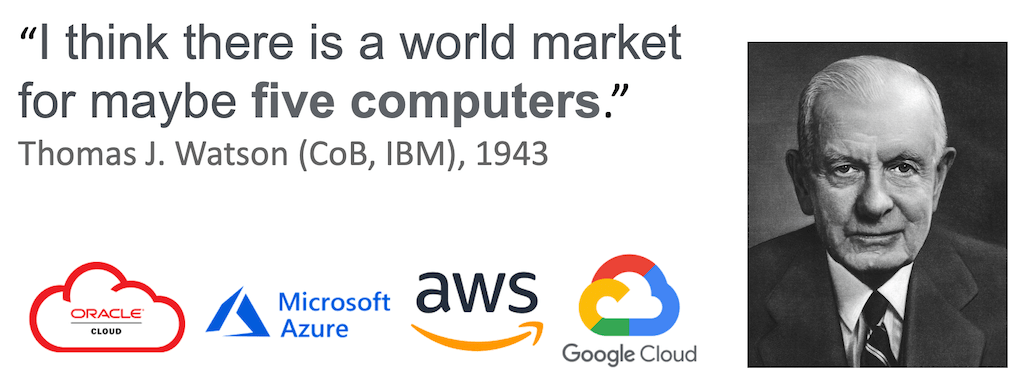
There’s a tale of a true visionary who once proclaimed that there’s a global market for only five clouds. For years, he was misunderstood and even ridiculed. His foresight surpassed that of ordinary minds, envisioning a future akin to that of Mr. Watson.

One could argue that the shared IT services market has been evolving since the 1960s to its current state. The market has expanded exponentially, and technological advancements have been nothing short of remarkable. Notably, the level of automation has surged to unprecedented levels, almost beyond belief.

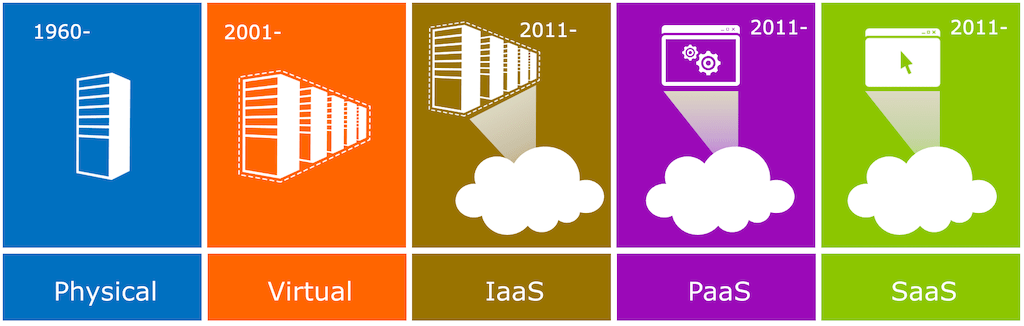
The advent of industrially manufactured computing systems in the 1960s marked a significant milestone. Virtualization, pioneered by a company named VMware in 2001, proved to be a pivotal moment, revolutionizing the automation of IT environments. Subsequently, distributed computing and automation ushered in the era of the Cloud. The diagram below illustrates this transformative journey:

Virtualization enabled an unprecedented degree of automation. A single administrator could now manage over a hundred servers, a monumental leap in enhancing the efficiency of IT operations. Naturally, the demand for data processing power and storage skyrocketed exponentially.

Let’s delve briefly into virtualization technology. It facilitated the automation of tedious and routine tasks, while also optimizing space and reducing energy consumption.

Perhaps the most significant advantage lies in simplified installations (cloning) and significantly reduced downtime (thanks to features like High Availability and snapshots). Software robotics and automation have further empowered us to accomplish complex tasks with a mere click.

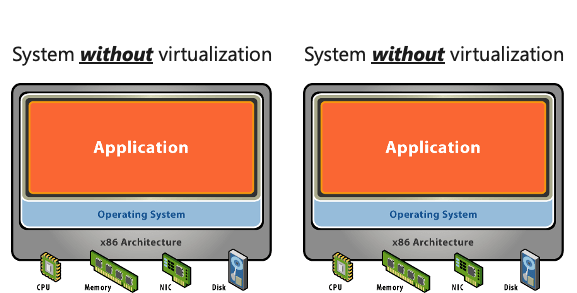
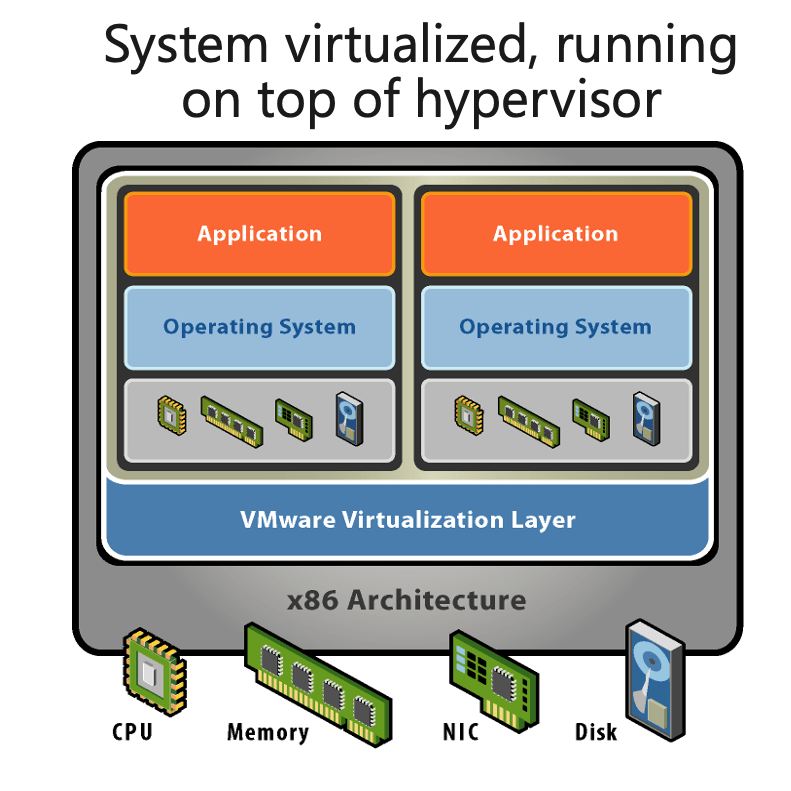
Virtualization, very quick intro

Virtualization abstracts the BIOS, operating system, and applications from physical hardware, enabling multiple virtual machines to share the same physical infrastructure, thus saving costs, space, and energy. Moreover, virtualization standardizes hardware across multiple generations and vendors, eliminating the need for frequent OS re-installations or driver changes.

In essence, the Cloud transcends the realm of mere computer rentals.

As we’ve come to understand, the journey from shared computer systems in the 1960s to today’s Cloud environments has been nothing short of remarkable.

It’s crucial to acknowledge the myriad services offered within the Cloud. Virtualization was merely the starting point, transitioning servers into virtual machines through shared layers of virtualization hardware (CPU, memory, network, and storage). Subsequent advancements occurred at an exponential pace, culminating in Infrastructure as Code (IaaS), where computing power, memory, storage, network, and software solutions seamlessly integrate into a cohesive entity. Platform as a Service (PaaS) and Software as a Service (SaaS) naturally followed suit.

The classic Pizza as a Service analogy beautifully encapsulates the essence of IaaS, PaaS, and SaaS.

You see the idea when comparing that to the cloud services schema:

By the way – do you need ready made slides for a training or cloud history introduction? Just ping me, done multiple slide shows to cover that topic. And I am willing to share all. “PowerPoint Open Source Spirit”, or something. 😉

Featured

Microsoft Ignite 2021 – the first day

Microsoft Ignite is here again. Did I write ‘here’? That was not the best way to formulate. ‘It’s now streaming’ is much better. Ignite – like many other gigaevents – is transferred to virtual format. For a geek like me this is just fine. No need to fly and travel. Just sitting down to my sofa and enjoying the content!

Anycase, Microsoft has a long tradition for launching new products, services and updates on Ignite. That’s the one key reason for all working with MS ecosystem to participant Ignite. And this practice seems to continue even during the times of virtual Ignite. The announcements and news of the first day were breathtaking. It almost felt like my brain was swollen. Or maybe it was because of I was listening Ignite sessions to very late night (I am located EET time zone) and after 4 h of sleep I feel a little fuzzy. One way or another, it was worth of it. Yesterday’s jetlag is today’s “streaming-lag”. 🙂

Ok, enough chit-chat. Let’s move to the topic. New launches and announcements. Here comes some of those that enchanted me:

Extended network for Azure – directly to GA. This awesome service gives you possibility to stretch an on-premises subnet into Azure! Think about! When migrating to Azure on-premises virtual machines can keep their original on-premises private IP addresses.

SMB over QUIC – now GA. As short described “the SMB VPN”. That’s something really awesome for telecommuters like me and mobile device use case. Anywhere when high security for stretched filesystem is needed without traditional VPN tunneling.

Custom configuration for Windows Server and Linux VM’s and support for Azure Arc-enabled server VM’s – now in preview.

New virtual machine types (yeah, again – noe Dv5 and Dasv5 with AMD CPU’s. Ev5 and Easv5 with AMD CPU’s) – interesting! Microsoft+Intel has been so long kind of standard set.

On-demand disk bursting – now GA. Excellent functionality to improve startup times and take care of traffic spikes cost efficient way.

Couple of new networking tools are launched for preview. Azure GW Load Balancer and Azure Virtual Network Manager, both long waited and wanted functionalities. Been using own hack for VNet management? Mee too. Finally this is over.

Trusted Launch of VM’s – now GA. Like you see, Microsoft is focusing strong on security. This is improving security of gen 2 VM’s. And no additional price!

And Azure Bastion has finally moved to GA.

AVS aka Azure VMware Solution had a lot of visibility in Ignite. That’s good because the solution is great – but unfortunately came to market quite hopelessly late (and I don’t even mention the miscarriage when Google grabbed the subcontractor).

AKS aka Azure Kubernetes Service gained impressive new functions and many sessions.

Interesting was strong co-operation with wider coverage of “bare metal almost cloud” kind of vendor partners. VMware, Cray and NetApp had stayed strong options for “cloud like” hosting. SAP and Oracle have moved forward, deeper offering on Azure together with Microsoft. And then there are new players: Teradata and SAS. After seen multiple very painfull migration projects from Teradata to Azure I really understand the need for that. Still, it’s a strange marriage.

Featured

Welcome and thanks for all the fish

I am delighted to welcome you to my blog. It’s crafted with you in mind because, honestly, why else would I invest time in writing articles? While I thoroughly enjoy reading, the prospect of diving into my own text isn’t all that enticing (after all, I already know what I intended to write).

Since this blog is dedicated to you, I aim to provide content that adds value to your day. If you have any questions about Azure, Microsoft, cybersecurity, or anything else, don’t hesitate to reach out. Perhaps I can offer some insights, share experiences, or at the very least, point you in the right direction.

Now, allow me to share a bit about myself:

  • My name is Sami Isoaho (at your service!).
  • A proud geek residing in Finland, I’m immersed in the cybersecurity field. Currently I am a multitasker and do Enterprise Architecture as well as Microsoft Certification Trainings.
  • The best title I’ve ever held was during my time at Loihde Trust. Officially I was recognized as the Principal Cloud and Security Architect – or sometimes, Principal Microsoft Security Architect. But let’s be real, on my business card (yes, I actually had some during those years), there was just simply ‘The Cloud Guy’ – a moniker I’ve grown rather fond of.
  • Previously, I had the privilege of working at Microsoft as a CSA (Cloud Solutions Architect), and if I may boast a bit, I was a “Senior” CSA. Before my Microsoft days, I contributed my expertise to VMware as a Global Solution Consultant.

So, why not connect, bro (or sis, with even more enthusiasm)?

You can find me on LinkedIn (www.linkedin.com/in/isoaho) or Facebook (http://www.facebook.com/sami.isoaho). And if Instagram is more your vibe, you’ll catch me under @sisoaho, or simply click https://www.instagram.com/sisoaho/.

Oh, and feel free to shoot me an email! It’s just my firstname at my domain (I trust you can figure that out ;).