The credit for this blog post goes to a friend of mine. In the middle of an access-management hardening exercise, he sent me into a state of pure networking euphoria with an inspiring LinkedIn chat.
Niklas brought up an old LinkedIn post of mine in which I commented about the internet connectivity setup at my remote office. You see, I spend my days in a sparsely populated area, and the internet is not only the most essential enabler of my work but also a vital connection to the outside world for many of my hobbies and interests. Consequently, I am not easily satisfied with the network capacity available to me.
Especially since you cannot get a proper connection out here in the back of beyond, no matter how much you are willing to pay.
First and foremost, I want to highlight the Swiss Army knife of connectivity in remote locations: Starlink. It is an absolutely killer solution for challenging connectivity conditions.
Starlink only requires a sufficiently unobstructed view of the sky—a factory’s flat roof is an excellent location. Finding a suitable installation site in a city may be more difficult unless you happen to live on the top floor of an apartment building. On an island, at the bottom of a remote peninsula or in the backwoods of Lohja, however, Starlink is practically guaranteed to provide decent bandwidth. RAN connections (Radio Access Networks, better known to us as 4G and 5G) can suffer from extremely poor coverage in places like these.
You may need to clear away a few obstructing trees or mount the dish on top of a proper pole, but download speeds of around 300 Mbps are achievable anywhere in Finland. The only significant drawback is the relatively high latency.
For ordinary use, like web browsing, Teams meetings, streaming and email, it is hardly noticeable. Latency is poison for gaming, however, and it may also become irritating when working through RDP or SSH if the destination is far enough away—for example, on another continent.
My own problem is one annoyingly dynamic pine tree. It has grown enough (over 1 m!) since the installation that my connection now experiences a three-to-six-second packet loss time roughly once every five minutes. Looks like I need to raise the Starlink pole on the roof by another metre. Apparently, getting rid of the tree is not an option, as the “the headmaster” has threatened to make me sleep in the garage.
But What About Reliability?
When there is no perfect option, you have to make do with the least imperfect solutions available. The problems usually come from two directions.
First, the performance of the available connections does not meet demanding requirements, so you have to settle for whatever is available. That said, Starlink provides a level of connectivity that is perfectly sufficient for professional use, even deep in the countryside.
The second problem is trickier: connection stability does not match that of high-quality fibre. On the other hand, for someone working entirely remotely, I do not believe even a consumer fibre connection provides sufficient resilience on its own. Consumer connections are certainly not guaranteed to work continuously, and their SLAs are what they are. I have witnessed routing outages lasting more than 24 hours with several different operators.
Redundancy is relatively easy to arrange, however: use connections from multiple operators. Alongside a fibre connection, you could add even a moderately performing 4G or 5G connection. The more operators you use, the less likely it becomes that all their networks will fail simultaneously.
Finland has three nationwide mobile network operators: Telia, Elisa and DNA. In rural areas, it is extremely rare for several operators to provide sufficiently strong coverage at the same location. A prepaid 5G subscription is a good and inexpensive way to test an operator’s actual performance in your area.
My own solution is to use connections from all three mobile network operators with Starlink’s cheapest plan providing additional redundancy.
One of the mobile connections can theoretically provide excellent bandwidth. Its maximum speed has exceeded 500 Mbps in the early hours of a public-holiday morning. Unfortunately, the capacity of that mobile broadband has been heavily oversold, so during the day the available bandwidth fluctuates almost unbelievably.
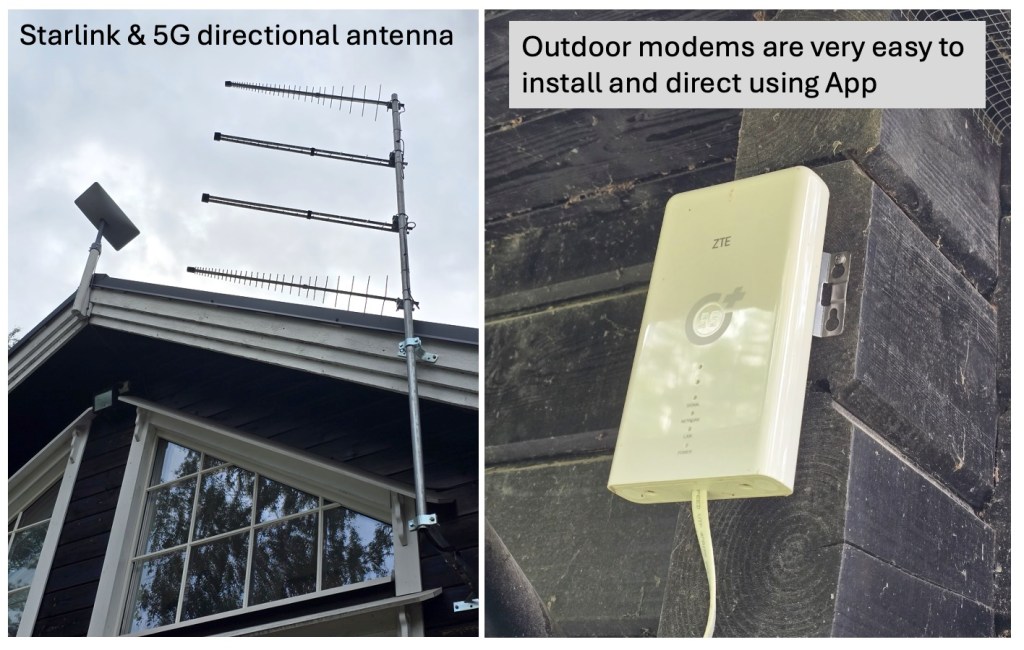
The base station is also so far away that I had to use a highly directional, high-gain antenna. The other two operators provide considerably less bandwidth but also much less variation in speed. Their base stations are also close enough that an outdoor modem and careful alignment were sufficient.
This naturally costs money, but for a system that is critical to my business, the overall solution is relatively inexpensive. Starlink costs €35 per month, while the primary mobile connection costs €26.95 per month. I picked up the two backup connections through special offers. In an area with poor radio coverage there is little point paying for anything faster than 100 Mbps—because even that speed will rarely materialise.
In total, my connections cost less than €65 per month, excluding VAT. This setup has now delivered more than nine months of completely uninterrupted data connectivity. Very few enterprise-grade connections can match that.
My thinking has changed: I no longer consider a connection that relies on a single operator to be genuinely uninterrupted or resilient. It makes no difference whether you have fibre delivered through two physically separate routes, supplemented by a separate mobile backup connection. The operator still has to perform maintenance or may simply botch its routing.
The only way to achieve genuinely reliable connectivity is to distribute it across the networks of multiple operators. Modern SD-WAN technologies have made this ridiculously easy.
So, What About Bandwidth?
When several connections are used in parallel, the practical options are connection bonding and load balancing. These are two completely different ways of utilising multiple connections.
When I moved out here to the back of beyond, I initially had to bond several connections because none of the mobile operators could provide even respectable speeds with equipment installed indoors—and Starlink was not yet available. Maximum speeds were around 70 Mbps.
Bonding is often referred to as bandwidth aggregation. In plain language, this means combining the capacity of several separate connections into one larger connection. In the best-case scenario, the bandwidth available between locations X and Y will be roughly equal to the combined capacity of the individual connections.
For example, if you have connections providing 100 Mbps, 50 Mbps and 40 Mbps, you can combine them and potentially achieve close to 190 Mbps of bandwidth for a single data transfer.
Technically, the mechanism works by establishing a connection from the source to the destination through each available path. At the destination, there is a physical or virtual endpoint behind a fast internet connection. The VPN tunnels established between these points are combined (“bonded”) into a single logical connection.
For migrations and the replication of large volumes of data, this may be the only workable option if the capacity of each individual connection is too limited.
The challenge with combining tunnels is the additional latency it introduces. My aggregation point was initially hosted in Azure. We MCT’s (Microsoft Certified Trainers) receive complimentary Azure credits. However, I found myself in a situation where even a direct Starlink connection provided lower latency. Moving the aggregation point to a Finnish data centre improved the result.
In practice, bandwidth aggregation (aka bonding) is not the best solution for ordinary remote-office use. It is useful for operations that require substantial bandwidth, such as cloud migrations. Unfortunately, you have to decide at the application level which traffic should be routed through the bonded group of VPN tunnels. Teams traffic and ordinary web browsing, for example, are usually better routed elsewhere because sending them through the bonded connection may degrade the user experience. Eventually, the firewall’s routing rules become quite complicated.
Bandwidth bonding is also problematic when the underlying connections experience brief “blips.” It generally takes several seconds for the tunnels and routing to recover from an interruption. With poor-quality connections—the eternal curse of living in the woods—this can cause significant challenges.
If you nevertheless want to combine connections and achieve top-tier download speeds through aggregated bandwidth, consider a purpose-built commercial solution. Mushroom Networks and Peplink, for example, offer extremely easy-to-deploy mobile connection bonding solutions. Having tested both, I can recommend them. You really cannot go wrong. Naturally, a high-quality firewall such as a FortiGate or Palo Alto can also bond multiple WAN connections.
I have personally moved to load balancing. My firewall distributes traffic across four connections according to the following rules:
- Traffic from Teams and RDP sessions used by my wife and me—as we both work from here in the countryside—is always routed through the SD-WAN link with the lowest latency to the Teams service. PROVIDED that the link has no packet loss whatsoever and offers more than 70 Mbps of available download capacity and more than 20 Mbps of upload capacity. If those conditions are not met, the traffic is moved to the connection with the second-lowest latency.
- Web-browsing traffic is routed through the other SD-WAN members. This leaves the optimal amount of capacity on the lowest-latency connection for Teams and RDP traffic.
- Secondary traffic—we have more than 40 IoT devices, eight continuously reporting surveillance cameras, backup traffic and all sorts of other miscellaneous junk—is always routed through the weakest connection.
- After 5 p.m., gaming traffic is routed through the connection with the lowest latency.
In principle, the difference between bonding and load balancing is relatively insignificant in a multi-user environment. If you have two connections, each providing approximately 100 Mbps, shared by ten employees, it generally makes little difference to the users whether the router or firewall distributes their traffic between the two connections through load balancing or combines the connections into a single logical pipe.
Bonding becomes advantageous when an individual user or data transfer requires more capacity than a single connection can provide but is prepared to compromise on latency and resilience in return.